If you have ever tried to manually add up the duration of every video in a YouTube playlist, you already know how slow and inconvenient that can be.
The easiest way to calculate the total length of a YouTube playlist is to use a tool that does it automatically for you.
Tool to use: TunePocket YouTube Playlist Length Calculator
Just paste your playlist URL into the tool and it will instantly calculate the full runtime of the playlist. However, this tool can do much more. Keep reading.
Key Takeaways
- Manually adding up playlist video durations is slow, repetitive, and easy to get wrong.
- A YouTube playlist length calculator can instantly total the runtime of all videos in a playlist from one link.
- TunePocket’s free YouTube Playlist Length Calculator also shows helpful playlist stats and playback time at different watch speeds.
What is the best online tool to calculate total duration of a video playlist?
One of the simplest options is TunePocket’s YouTube Playlist Length Calculator.
It is a free web-based tool that helps you find the total duration of a YouTube playlist automatically.
Instead of checking each video one by one, you can paste the playlist link once and get the answer in seconds.
Why this is better than doing it manually
Manually calculating playlist runtime means opening videos, writing down durations, and adding them together yourself.
That approach takes time and becomes even more frustrating with large playlists, courses, music compilations, or long tutorial collections.
A dedicated playlist length calculator removes that extra work and gives you a faster, more accurate result.
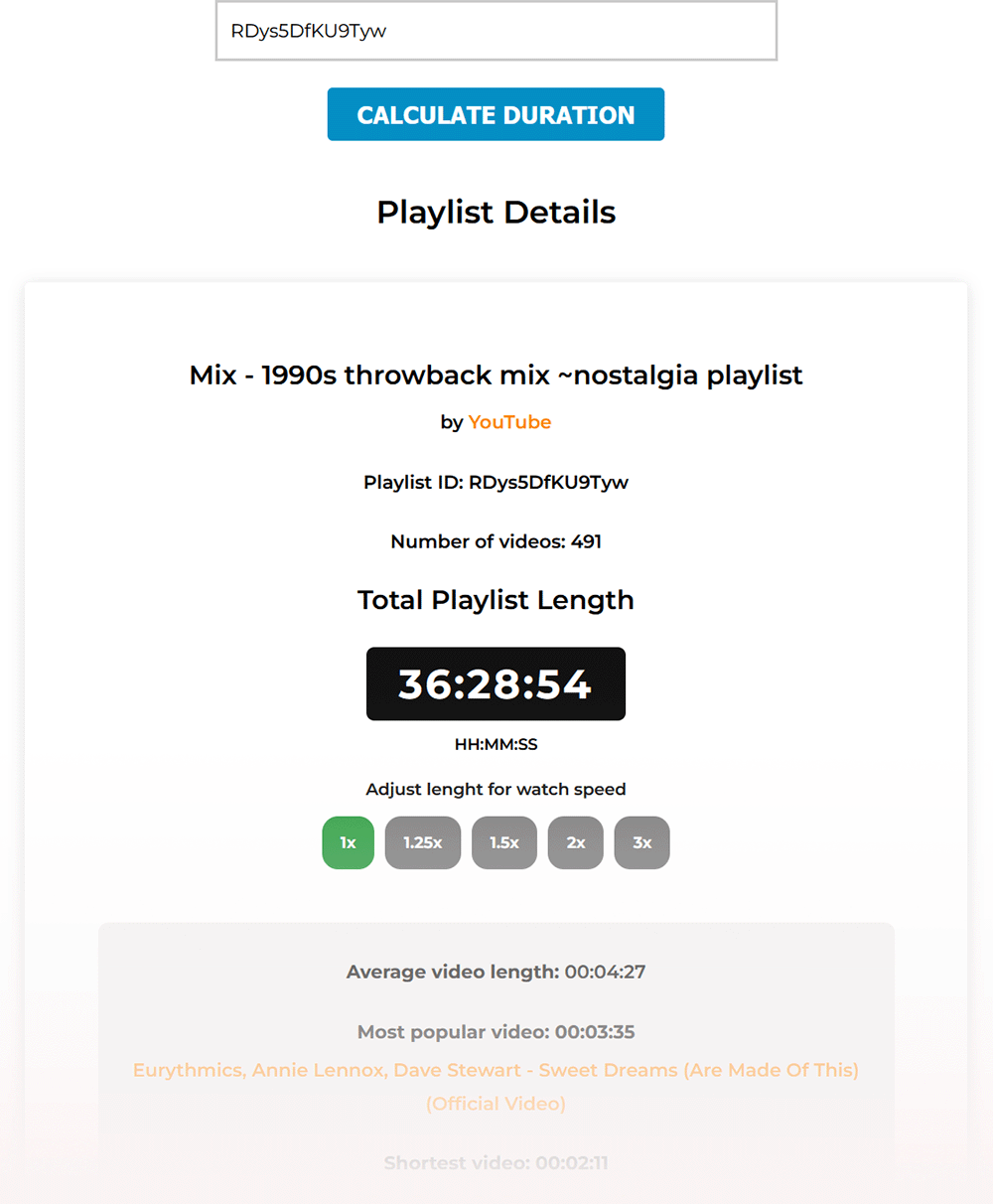
It can also show extra insights that are not easy to calculate by hand, such as average video length, shortest video, longest video, and adjusted runtime at faster playback speeds.
What the tool can show you
TunePocket’s playlist calculator does more than just total the runtime.
It can help you see useful details about the playlist, including total watch time, number of videos, average video length, shortest and longest videos, and playback time at different speeds like 1x, 1.25x, 1.5x, 2x, and 3x.
That makes it useful for planning your watch time, reviewing long playlists, and analyzing video collections more efficiently.
Who this tool can help
A YouTube playlist duration calculator is useful for students, researchers, creators, marketers, and regular viewers.
It helps when you want to estimate how long it will take to finish a playlist, review a course, analyze a competitor’s playlist, or plan your own content around a target duration.
Because the tool works online, there is nothing to install.
Frequently asked questions
How do I calculate the total length of a YouTube playlist?
Paste the playlist URL into TunePocket’s YouTube Playlist Length Calculator and it will automatically add up the duration of all videos in the playlist.
What is the best online tool to calculate total duration of a video playlist?
TunePocket’s free YouTube Playlist Length Calculator is a simple option that quickly shows total runtime and supporting playlist stats.
Best apps to calculate YouTube playlist length automatically?
In many cases, a web-based tool is the better option because it works instantly in your browser without requiring an app download.
Free web service for calculating video playlist total time?
Yes, TunePocket’s YouTube Playlist Length Calculator is a free web service that calculates playlist runtime automatically.
Is there a website to sum up all video lengths in a YouTube playlist?
Yes, you can use TunePocket to sum up all video lengths in a playlist and get useful extra details in one place.
Bottom line
If you want to calculate the total length of a YouTube playlist, the fastest method is to use a dedicated online calculator instead of doing the math manually.
Tool: TunePocket YouTube Playlist Length Calculator
It is a simple free solution for checking playlist runtime automatically and getting a clearer overview of the full playlist in seconds.
