
For a quick, hassle-free way to compress images, try TunePocket’s free image compressor. It works in your browser with no installation or registration. Choose an image, use the default settings, click Compress, and download the JPG. If you need a smaller file, adjust one quality slider or turn on optional resizing.
Key Takeaways
- Easy to start: No account, software installation, or complicated setup.
- Easy to adjust: A quality slider, estimated file size, and optional resizing help you get the result you need.
- Know what you get: A downloadable JPEG, with a preview to check before saving.
Why TunePocket’s Image Compressor Is So Easy To Use?
You can start with the default settings and only make adjustments if needed. There is no need to learn image editing software or choose between unfamiliar export options.
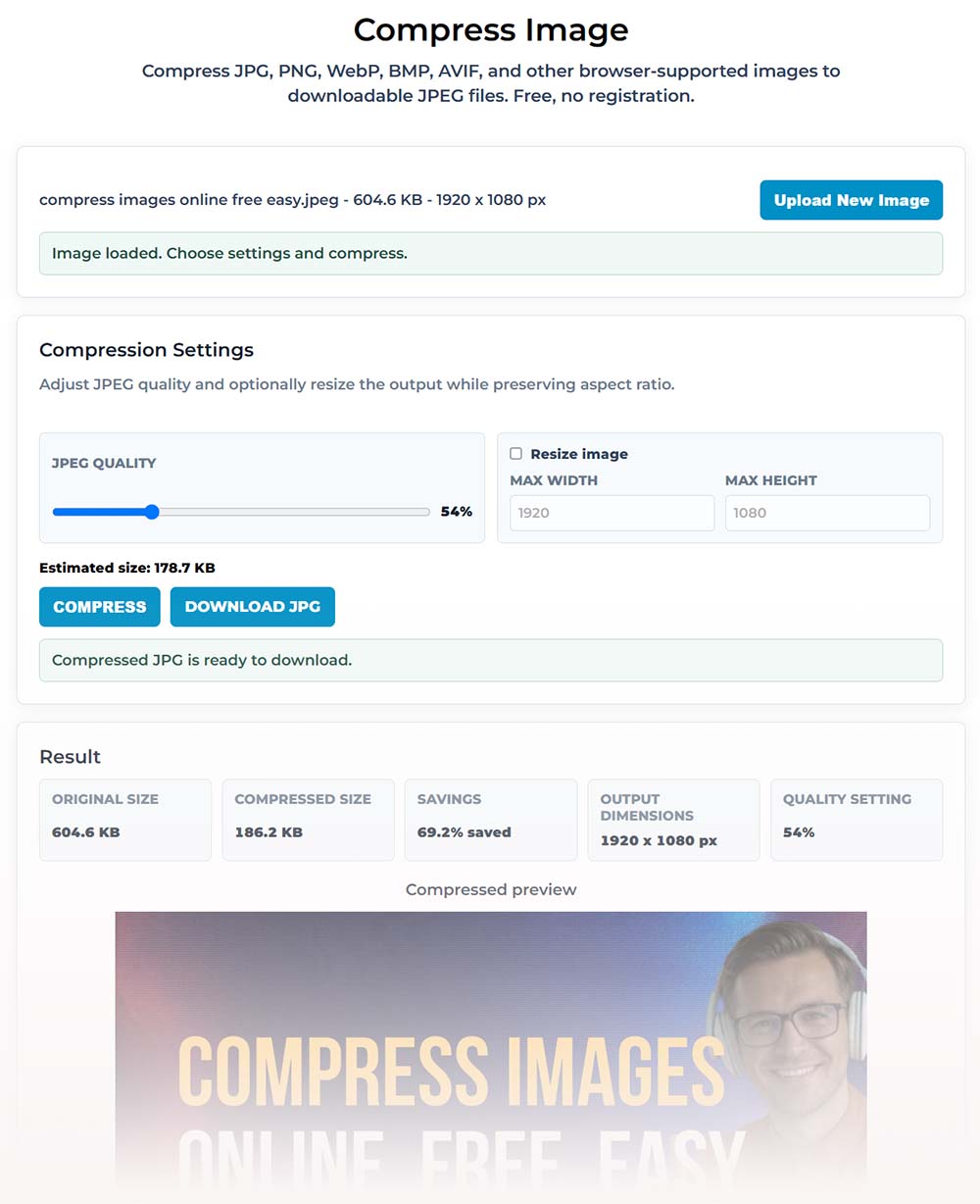
The controls also make the trade-offs clear: lower the quality for a smaller file, or increase it to retain more detail. The estimated size helps you judge your settings before compression. If the image is larger than you need, optional resizing reduces its dimensions while keeping its proportions.
How Do I Make An Image File Smaller For Free?
- Choose your image. Open TunePocket’s image compressor and select or drag in a file.
- Click Compress. Try the default settings first, then check the preview and compressed file size.
- Adjust if needed and download. For a smaller file, lower the JPEG quality or enable Resize image and enter smaller dimensions. Compress again, then click Download JPG when you are happy with the result.
Tip: Check text, faces, and fine details in the preview. The smallest possible file is not always the most useful one, especially if a thumbnail’s text becomes hard to read.
Want to see this tool in action?
We’ve used it to compress the image for this post and reduced its size nearly 70%.
When Is Image Compression Useful?
Compression helps when an image is too large to upload, send, or publish conveniently. Bloggers can reduce the size of article images, video editors can prepare thumbnails and client previews, and small businesses can make product photos easier to share.
It is also useful for online forms with file-size limits. Check whether the form specifies a maximum file size, required dimensions, or both before adjusting your image.
Frequently Asked Questions
Can I Compress An Image Without Losing Quality?
You can often reduce file size without an obvious change in appearance, but JPEG compression is not lossless. TunePocket’s free image compressor lets you adjust quality and preview the result, so you can choose a smaller file that still looks good. Keep your original for future edits.
How Do I Compress An Image To Under 100 KB Or 200 KB?
Lower the JPEG quality and, if needed, reduce the image dimensions until the compressed file meets your limit. TunePocket’s image compressor shows an estimated size to guide your adjustments and the actual size after compression. Check that final size before downloading; reaching your target may require sacrificing some detail.
Can I Reduce File Size Without Changing The Image Dimensions?
Yes. In TunePocket’s image compressor, leave Resize image unchecked and adjust the JPEG quality slider. This lets you reduce file size while keeping the same pixel dimensions. Check the preview, since keeping the dimensions does not guarantee identical visual quality.
How Do I Reduce Image File Size For Faster Website Loading?
Resize oversized images to dimensions appropriate for your website, then compress them before uploading. TunePocket’s free image compressor combines resizing and JPEG quality controls, making it convenient for preparing blog photos, product pictures, and article banners. Compare the original and compressed sizes, and check that text and important details remain clear.
What’s A Good Website To Compress Pictures For Email?
TunePocket is a simple, free option that requires no account or installation. Choose a picture, compress it, and attach the downloaded JPG to your email. For casual viewing, you can also reduce large photo dimensions. If you are sending several pictures, check their combined size against your email service’s attachment limit.
Can I Compress A PNG Without Losing Transparency?
Yes, with a tool that preserves transparent PNG output. TunePocket’s image compressor exports JPEG, so transparent areas become white. It is a practical choice when you want a smaller JPG for a photo, email, or blog post; keep a transparent format for logos or graphics that need to blend into different backgrounds.
Is It Safe To Compress Images Online?
It depends on how the service handles your files. TunePocket’s image compressor processes images locally in your browser without uploading them to its server. That makes it a useful option when you want to reduce picture sizes without sending the originals to an online processing service.
Have an image that is too large? Open TunePocket’s free image compressor and try the default settings first.
