
Making Audio Loops Should Not Be Complicated
Creating a clean audio loop sounds simple until you actually try doing it.
Many existing audio tools are either full desktop editors, pro audio workstations, or niche loop utilities. That often means downloading software, installing plugins, learning a new interface, checking system compatibility, or manually zooming deep into the waveform just to find a clean loop point.
That may be fine for advanced audio editors, but it is too much when you simply need a short sound, music part, ambience, or background section to repeat smoothly.
That is exactly why we made TunePocket Audio Loop Maker.
It is free, browser-based, and built for one focused job: creating seamless WAV loops without installing anything.
Existing Loop Tools Can Be Frustrating
Traditional audio editors can absolutely make loops, but they are often not designed around fast workflow.
You may need to install software, import the file, zoom into the waveform, find clean edit points, test the loop manually, add fades or crossfades, and then export the result in the right format.
Some online editors are easier to access, but many are general-purpose audio editors. They can trim and process audio, but they do not always guide you through the specific loop-making workflow.
For creators, video editors, podcasters, streamers, meditation channels, game designers, and app developers, that extra friction gets in the way.
Sometimes you do not need a full DAW.
You just need a loop that works. And you need it fast.
How To Make A Loop With TunePocket Audio Loop Maker
Using the tool is straightforward.
1Open The Tool
Open TunePocket Audio Loop Maker in your browser.
2Upload Your Audio File
Drag your audio file into the Upload area of the Web page.
3Review The Waveform
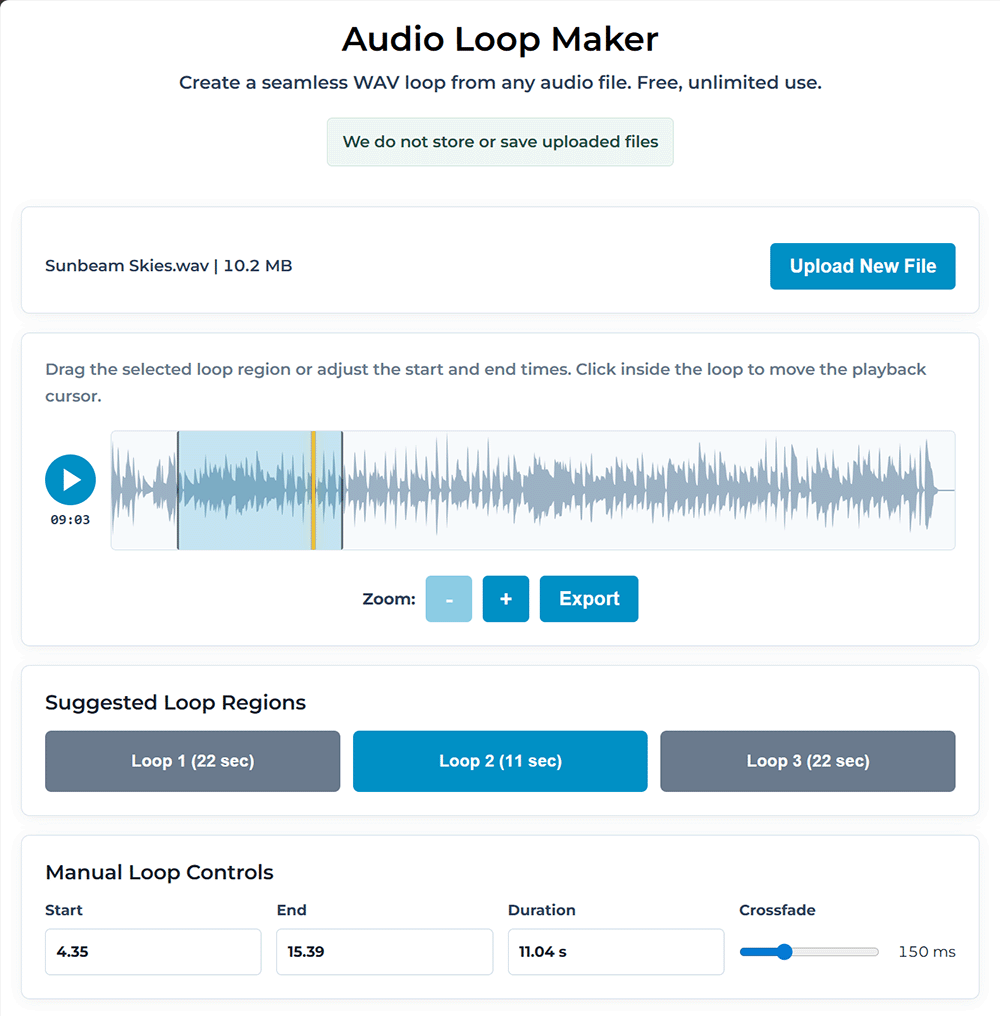
The tool shows the waveform so you can see the structure of the sound and find a good loop section.
4Choose Or Fine-Tune The Loop Region
Choose one of the suggested loop regions or set your own start and end points manually.
5Preview The Loop
Preview the loop to hear how it repeats and check whether the transition sounds smooth.
6Adjust The Crossfade
Adjust the crossfade if the transition needs smoothing or if you hear a click, pop, or rough edit point.
7Export The Finished Loop
When the loop sounds right, export it as a WAV file.
That is it. No DAW setup, no software download, and no complicated audio routing.
What Makes TunePocket’s Loop Maker So Useful
TunePocket Audio Loop Maker is especially helpful when you need reusable audio for video editing, background ambience, game sounds, meditation tracks, stream scenes, app audio, podcast production, or short music sections.
The suggested loop regions help you get started faster.
The waveform view with zoom gives you visual control.
The crossfade control helps reduce clicks, pops, and rough transitions.
The WAV export gives you a high-quality file you can use in your editor, DAW, game engine, or video project.
Best of all, it works in any modern browser, including Windows, Mac, Linux, and Chromebook and is 100% private (your files never leave your device).

Try The Free Online Loop Maker
If you have ever struggled to make a music loop, ambience loop, sound effect loop, or background audio loop, try TunePocket Audio Loop Maker.
It is fast, focused, private, and free to use as often as you need.
Finally, a free online loop maker that works.
