Need to combine several recordings, music tracks, voice clips, or sound effects into one audio file?
You can do it for free and without installing any software using the TunePocket Audio Joiner / Merger.
Key Takeaways
- Combine up to 20 audio files into one MP3.
- Arrange and trim each file before merging.
- Choose no gap, silence, or crossfade between clips.
- Works directly in your browser, with no app to install.
When Would You Need To Combine Audio Files?
An audio joiner is useful whenever several separate clips need to become one continuous track.
- Podcasts: Combine intro, interview, ads, and outro.
- Voiceovers: Join separately recorded narration clips.
- Audiobooks: Merge several recordings into one chapter.
- Music mixes: Join songs with smooth crossfades.
- Video editing: Prepare one continuous soundtrack before importing it into your editor.
- Courses and presentations: Combine lessons, announcements, or recorded sections.
How To Combine Multiple Audio Files Into One Track
1 Upload Your Audio Files
Open the free audio joiner and drag in your files. It supports MP3, WAV, M4A, AAC, OGG, and FLAC.
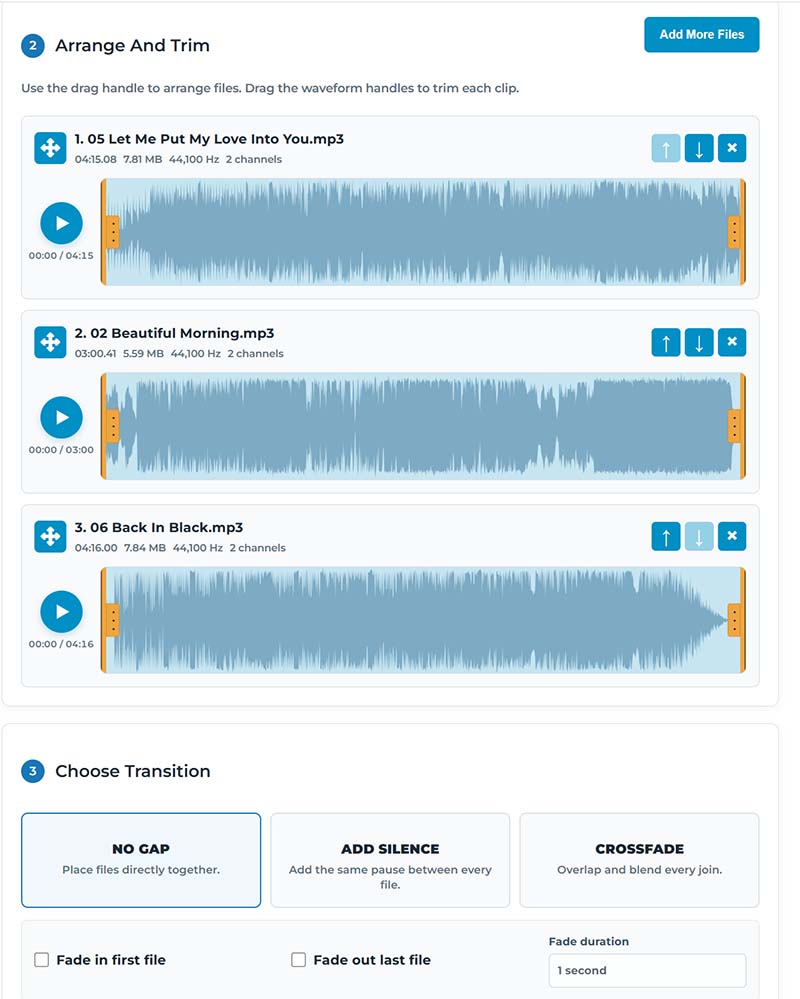
2 Arrange And Trim The Clips
Drag the files into the order you want them to play. Use the waveform handles to trim unwanted audio from the beginning or end of each clip.
3 Choose The Transition
Select No Gap for continuous playback, Add Silence to place a pause between clips, or Crossfade to blend one file smoothly into the next.
You can also add a fade in at the beginning and a fade out at the end.
4 Preview And Merge
Preview the complete track, make any final adjustments, then choose your MP3 bitrate and click Merge Audio To MP3.
Your separate files are now combined into one MP3.
No Audio Editing App Required
If you only need to put several audio files in sequence, there is no reason to install a full audio editor or DAW.
The TunePocket Audio Joiner works directly in your browser and processes your audio locally, making it a quick option for combining recordings, music, podcasts, voiceovers, and other audio clips.